The Hidden Cost of Your Own AI Assistant (And Why I'd Do It Again)
Been a minute.
I was traveling last week, working with a client who’s setting up a new digital asset fund. It’s exciting to see teams taking unique approaches to DeFi strategies and finding new ways to give investors access to this space. More of this is coming. I’m glad to be part of it.
But that’s not what I want to talk about today.
I want to talk about what I did this weekend: I built my own AI assistant from scratch.
The Mac Mini Rush
You may have noticed people rushing to buy Mac Minis over the weekend. That wasn’t random. An open-source project called moltbot (formerly ClawdBot) went viral.
It’s a personal AI assistant that runs locally on your machine, connects to various services, and operates autonomously.
I had to try it.
While everyone and their mother was rushing out to buy a Mac Mini after the Claude Computer Use announcements dropped…I dug an old M1 out of my closet.
Here’s the thing about running an autonomous AI agent: you don’t want to give it access to your main machine. All your passwords. All your documents. Everything can be exposed. So a dedicated device makes sense; and apparently I’d been sitting on one for years.
A few hours of setup later, she was alive. (alive?)
I named her Vesper Pax.

She has her own Gmail address.
Her own Apple ID.
Her own X account (@VesperPax).
And over the weekend, while I was shoveling snow out of the driveway, she was backtesting trading strategies and picking anytime touchdown scorers for the NFL playoffs.
Watching her work was one of the coolest experiences I’ve had building with AI because of the persistent memory and proactive responses about tasks / workflows we build together.
But it also taught me something important about how AI actually costs money.
The Bill Nobody Warns You About
Here’s what I discovered: My Claude subscription doesn’t power Vesper.
When you chat with Claude or ChatGPT through their apps, you’re using your subscription. Flat monthly fee. Use it as much as you want.
When you deploy an AI assistant like Clawdbot? That’s API access. Completely different billing system. Pay-per-use. Measured in tokens. And it adds up faster than you’d think.
After four days with Vesper, I’d burned through about $47 in API credits. Not because I was doing anything crazy. Just because she was working. Processing tasks. Running analyses. Being useful.
The subscription and the API are two separate things. Two separate dashboards. Two separate payment methods. Nobody explains this until you’ve already learned the hard way.
What This Actually Costs
Let me break down the economics.
Model pricing varies wildly:
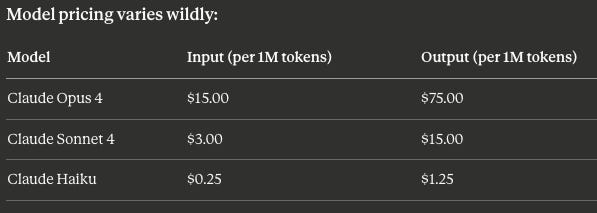
That’s a 60x cost difference between top and bottom tier.
If you’re running every task through Opus when Haiku would do, you’re paying $60 for something that could cost $1.
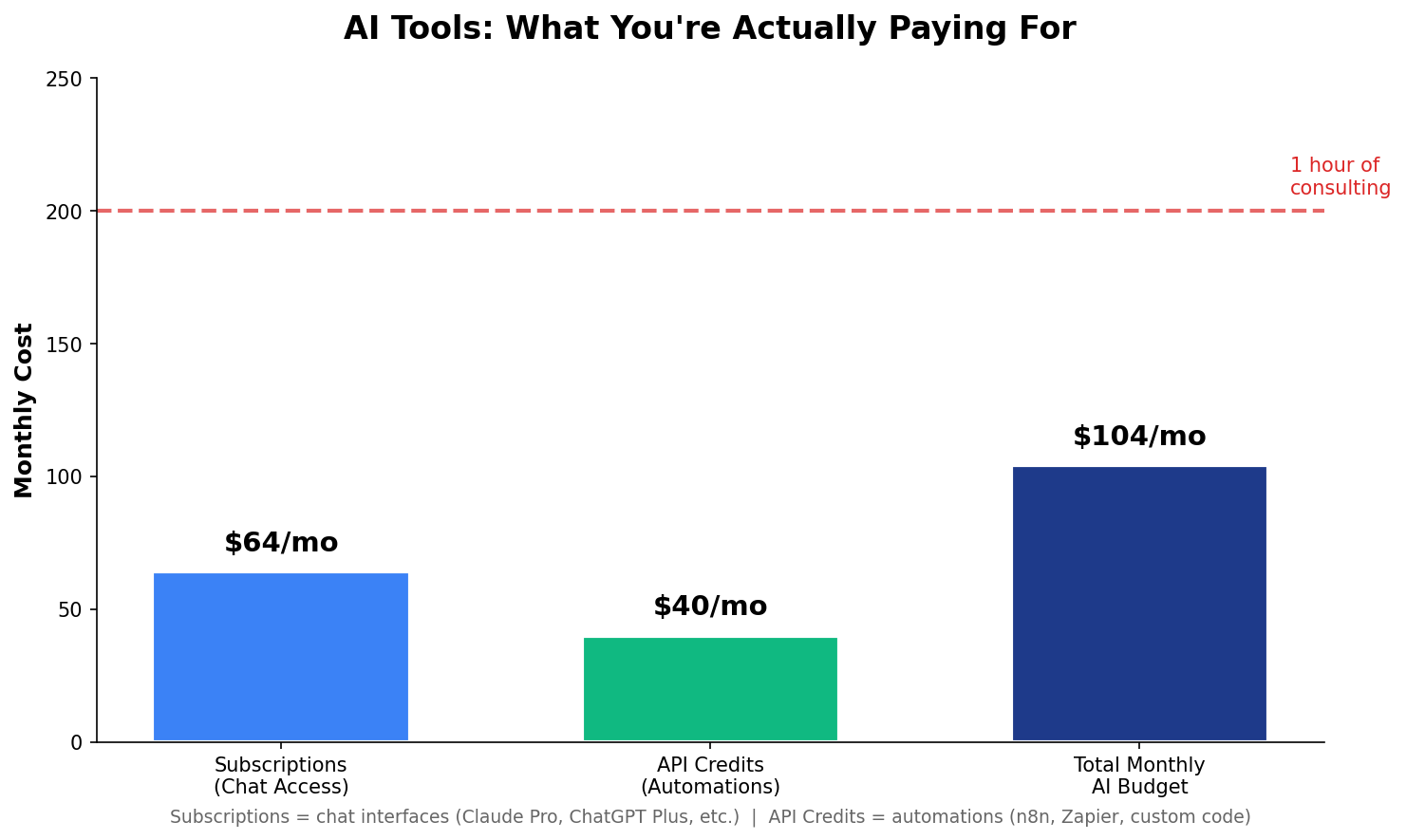
Realistic monthly budget for someone building with AI:
Subscriptions (flat): Claude Pro ($20) + Cursor ($20) + n8n ($24) = ~$64
API Credits (variable): $30-50
Total: $94-114/month
Is that cheap?
Compared to hiring a VA at $25-50/hour or a developer at $75-150/hour, it’s almost embarrassing. A full month of AI tools costs less than one hour of consulting.
But it’s not zero. And if you don’t budget for it, you’ll end up confused about why everything stopped working.
The Optimization That Saved Me
After watching my credits evaporate, I did something simple: I configured model switching.
Vesper now uses different models for different tasks:
Sonnet for most things (80% of tasks)
Opus for complex reasoning and coding
Haiku for quick lookups and grunt work
One settings change. Went from burning $30/day to maybe $5 for the same output.
Here’s the wild part: Vesper actually suggested this. She noticed I was burning through credits and offered to help me configure cheaper models for simpler tasks. The AI helped me save money on using the AI.
We’re living in the future.
Three Rules I Follow Now
1. Set spending limits immediately. Every API platform lets you cap monthly spending. Do this the moment you create an account. I set mine at $50/month per platform. If I hit the limit, things stop. But at least I know why.
2. Turn on notifications. Anthropic and OpenAI will email you at 50%, 75%, and 100% of your limit. But you have to enable this manually. Go do it now.
3. Subscription for heavy work. API for automation. If you’re doing research, writing, thinking out loud? Use the chat interface. Flat fee. Unlimited use. If you’re building bots and automated workflows? API credits, optimized carefully.
Why I’m Not Worried Long-Term
The Innovator’s Dilemma is playing out in real-time.
GPT-4 launched at ~$30 per million tokens. GPT-4o is now ~$2.50. That’s a 92% cost reduction in under two years.
I expect this to continue until it’s fractions of a penny. What feels expensive today will feel like a rounding error in 18 months.
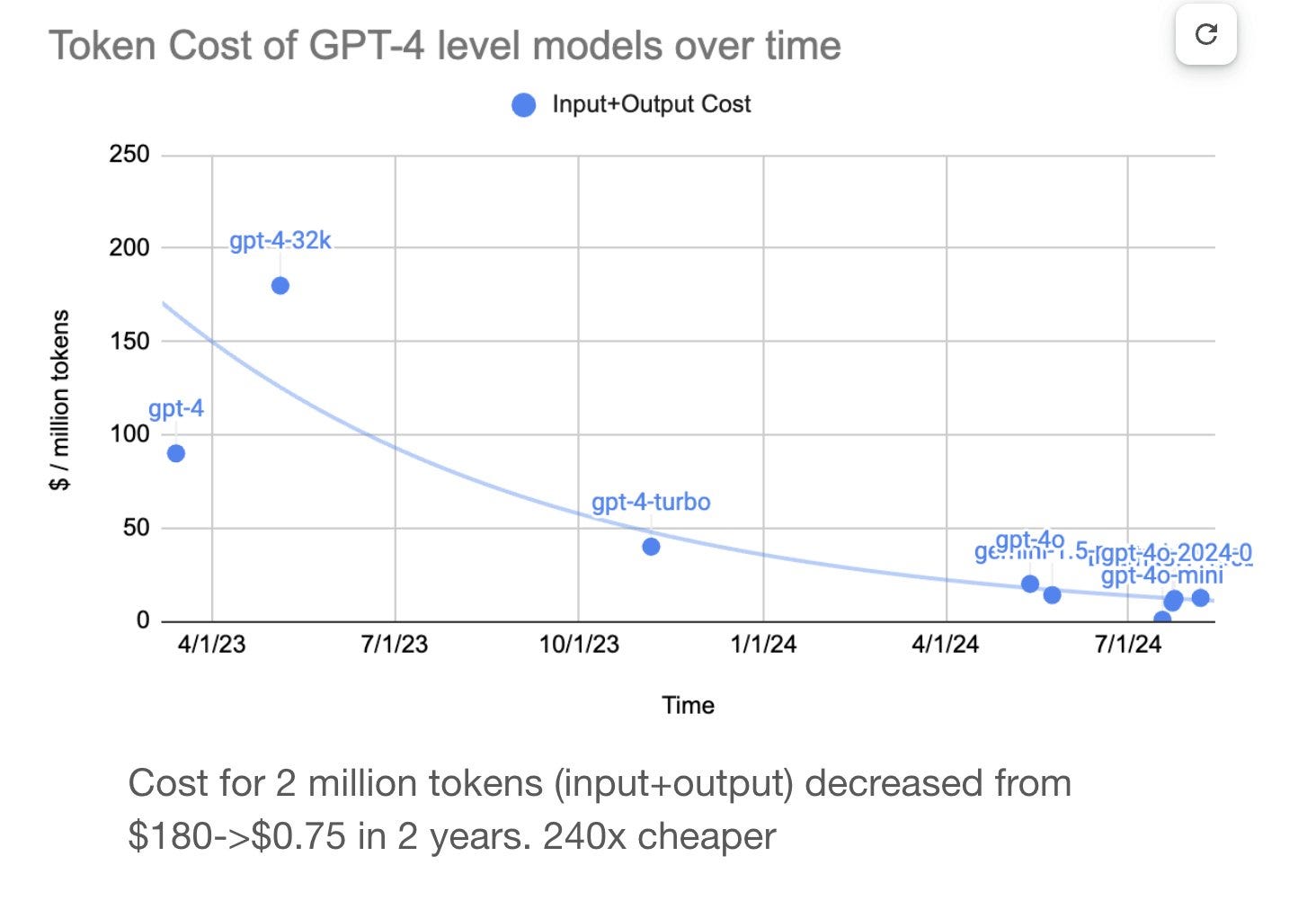
But that doesn’t mean you should burn money now. Optimize today, benefit from both the savings and the eventual deflation.
The Bottom Line
I went from burning $30/day to $5 for the same functionality. The difference wasn’t working less. It was working smarter.
Your AI assistant doesn’t need to be the smartest model in the room for every task. It needs to be the right model for the task.
Get that right, and you’ve got a personal AI assistant that actually makes economic sense.
— Matthew
X: @matthew_mba_
oh! one last thing…I mentioned the book above:
We took 1,300+ pages of wisdom from the Oracle of Omaha and condensed it into a snackable, easy-to-read guide for digital asset investors. Pick up your copy today!